Notes that teach
you back
All your lecture notes in one calm place. A minimal workspace that stays out of your way, and AI when you need quizzes, flashcards, or a quick explanation.
Used by students at







One place
Stop switching tabs to study
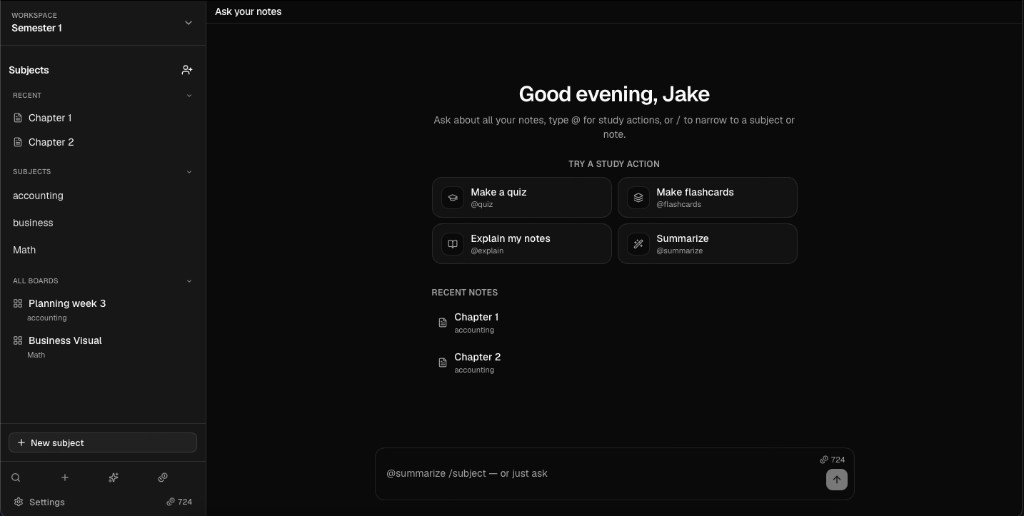
Notes in one tab, pictures in another, AI chat in a third — and the actual studying gets lost in between. AskNotes keeps everything in the same window.
How it works
From lecture to exam-ready

01
Capture the lecture
Write notes by subject, import a PDF as text, and link pictures and sources with / — everything stays in one place.

02
Ask your notes
Ask questions about one note, a whole subject, or every note in your workspace — answers stay grounded in what you wrote.

03
Practice until exam day
Turn your material into @quiz, @flashcards, and @exam practice so revision starts from your own lectures.
Features
Everything between the lecture and the exam
Slash references
Type /picture1, /video2, or /source3 to link every resource inline — and jump back to it from anywhere in the note.
Lecture 4 — Cost allocation
Two-stage model assigns overhead first to cost centres, then to products. See the flow in /picture1.
Worked example: /source2 · Walkthrough: /video1
Study with @quiz, @flashcards & @exam
Mark hard topics. Define terms inline.
Subjects & workspaces
Organize every course in its own subject. Switch workspaces when you juggle multiple degrees, minors, or study groups.
Ask your notes
Chat grounded in what you wrote — one note, a whole subject, or every note in the workspace. Scope with /accounting when you need focus.
Import lecture PDFs as note text
Study boards
Sketch mind maps, exam outlines, and diagrams beside your notes — without leaving the subject.
Shared workspaces
Invite classmates on any plan — Free up to 2 people, Plus 5, Pro 15. Share subjects and notes while each person keeps their own AI credits.
Pricing
Simple plans. Cancel anytime.
AskNotes is free to use. Subscribe when you need more AI.
Back to school: new accounts get 100 starter credits (normally 50) until 15 Sept. Upgrade anytime for monthly AI.
Free
Full notes workspace — try AI until credits run out.
€0/forever
Get started- 100 starting credits (school-year offer)
- ≈ 100 questions, or 33 quizzes/decks
- 1 workspace · subjects, notes & boards
- Share with up to 2 people
- Import PDF → note text
- Ask AI, @quiz, @flashcards & more
Plus
Enough AI for a steady semester — 300 credits every month.
€8.99/month
- 300 AI credits / month
- ≈ 300 questions, or 100 quizzes/decks
- Everything in Free
- Unlimited workspaces
- Share with up to 5 people
Pro
Heavy study weeks and collaboration — 800 credits every month.
€14.99/month
- 800 AI credits / month
- ≈ 800 questions, or 265 quizzes/decks
- Everything in Plus
- Share with up to 15 people
Cancel anytime. Credits renew with your plan.
FAQ
Focus on the signal, not the noise.
Accounts, sync, credits, and plans — how AskNotes works today. See also our Privacy Policy and Terms of Service.
Your next exam starts
in your notes
Free to start. Weekly free AI credits. Open AskNotes, add a subject, and turn tonight's lecture into tomorrow's quiz.
No credit card · Works in your browser